


After deploying a few Rails apps with Kamal, I started to feel the friction. Every time I wanted to check if my apps were healthy, I had to SSH into the server or run kamal app details for each project. Deploying meant switching directories, running commands, watching logs. Toggling maintenance mode? More terminal juggling.
This post is also available in Indonesian.
Then I watched DHH’s demo of ONCE, 37signals’ approach to self-hosted software with a unified dashboard. I’m not interested in converting all my projects into ONCE-supported apps, but the idea stuck with me: what if I could have that single-pane-of-glass view for my own Kamal deployments?
So I built HQ.
What is HQ?
HQ is a terminal-based (TUI) dashboard for monitoring and managing Kamal-deployed projects. It’s a single-file Ruby application that gives you a bird’s-eye view of all your deployments in one place.
Think of it as mission control for your Kamal fleet.
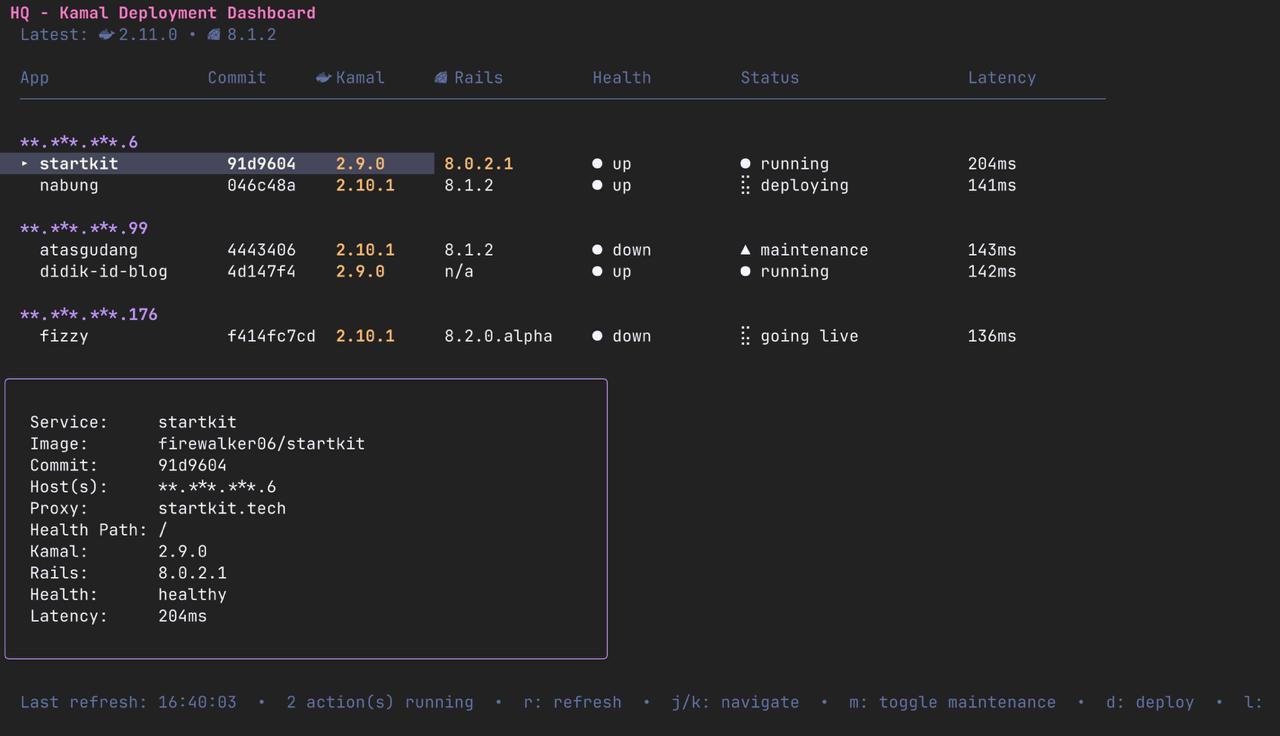
Features
Here’s what you can do from HQ:
- Health monitoring: See at a glance which apps are healthy, unhealthy, or in maintenance mode
- Version tracking: Shows Kamal and Rails versions, with outdated versions highlighted in orange
- Detail panel: Select any app to see its full configuration: image, hosts, proxy, healthcheck path
- One-key deploy: Press
dto deploy the selected project (with confirmation) - Maintenance toggle: Press
mto flip maintenance mode on or off - Action logs: Press
lto view deployment and action logs - Health logs: Press
hto view health check history - Auto-refresh: Health checks run automatically every 30 seconds
- Background actions: Deploys run in the background and survive HQ restarts
- Server grouping: Apps are grouped by host IP for easy scanning
The screenshot above shows HQ in action: five apps across three servers, with two concurrent actions running (one deploying, one going live), one app in maintenance mode, and the detail panel showing full config for the selected app.
The Stack
I chose to build HQ with Bubbletea, Lipgloss, and Bubbles: Ruby ports of the Go Charm libraries. If you’ve seen modern terminal apps like lazygit or k9s, you’ve seen what the Charm ecosystem can do.
The app follows the Elm Architecture (Model-View-Update):
class HQ
  def init
    # Initialize state
  end

  def update(message)
    # Handle input, update state
  end

  def view
    # Render the UI
  end
end
This pattern makes the app surprisingly maintainable despite being a single file. State changes are explicit, and the UI is a pure function of that state.
How It Works
HQ reads your Kamal project configurations directly. Point it at directories containing config/deploy.yml, and it extracts:
- Service name and Docker image
- Server hosts
- Proxy configuration and healthcheck paths
- Kamal and Rails versions (from
Gemfile.lock) - Latest commit hash
Health checks use HEAD requests (not GET) because kamal-proxy returns the correct 503 status for maintenance mode only on HEAD requests. A subtle gotcha I learned the hard way.
When you trigger an action like deploy, HQ spawns a detached process that runs bin/kamal deploy in the project directory. The process is monitored and its output is captured to log files. Because it’s detached, you can quit HQ and come back later: your deploy keeps running.
Why a TUI?
I could have built a web dashboard. But I spend most of my time in the terminal anyway. A TUI means:
- No browser tab to manage
- No server to run
- Instant startup
- Works over SSH
- Looks cool (let’s be honest)
The Dracula color scheme doesn’t hurt either.
Getting Started
bundle install
ruby hq.rb
Keybindings:
j/kto navigaterto refresh healthdto deploymto toggle maintenancelto view logsqto quit
What’s Next
HQ is still young. Some ideas I’m exploring:
- Multiple server support per project
- Rollback functionality
- Integration with error tracking services
- Remote server health checks (not just kamal-proxy)
Your Turn
Managing multiple personal applications is a nice problem to have. It means you’re shipping things. But it does get unwieldy after the third or fourth project.
HQ is my answer: a single Ruby file that gives me eyes on everything. It’s not public yet, but I’m sharing it here because I’m curious about how others solve this.
Do you have a similar setup? A dashboard or a script? I’d love to know how you approach managing your fleet of web apps.